We are just making sure that we provide a faster, safer, and more convenient digital experience for our members.
A PSSLAI Mobile App Enhancement will soon be implemented.
To ensure a smooth transition and uninterrupted access to your funds, members with available balances in their existing PSSLAI Mobile App E-Wallet are encouraged to:
- transfer their funds to other bank accounts
- use QR payments online and in-stores
- purchase load
- pay bills
on or before August 14, 2026.
Stay tuned for upcoming advisories as we introduce exciting improvements and enhanced features designed exclusively for PSSLAI members.
For assistance, please contact our Member Care hotlines:
(02) 8705-2100
0998 962-2081
0917 856-7443
Email us at: membercare@psslai.com
Thank you for your continued trust and support. We look forward to bringing you an even better PSSLAI Mobile App experience.
#PSSLAIAdvisory #PSSLAIMobileApp #PSSLAI
PSSLAI Mobile App
KAAGAPAY ANY TIME! KA-PARTNER ANYWHERE!
Introducing the NEW PSSLAI Mobile App, ang all-in-one app para sa lahat ng PNP, BFP, at Associate Members!
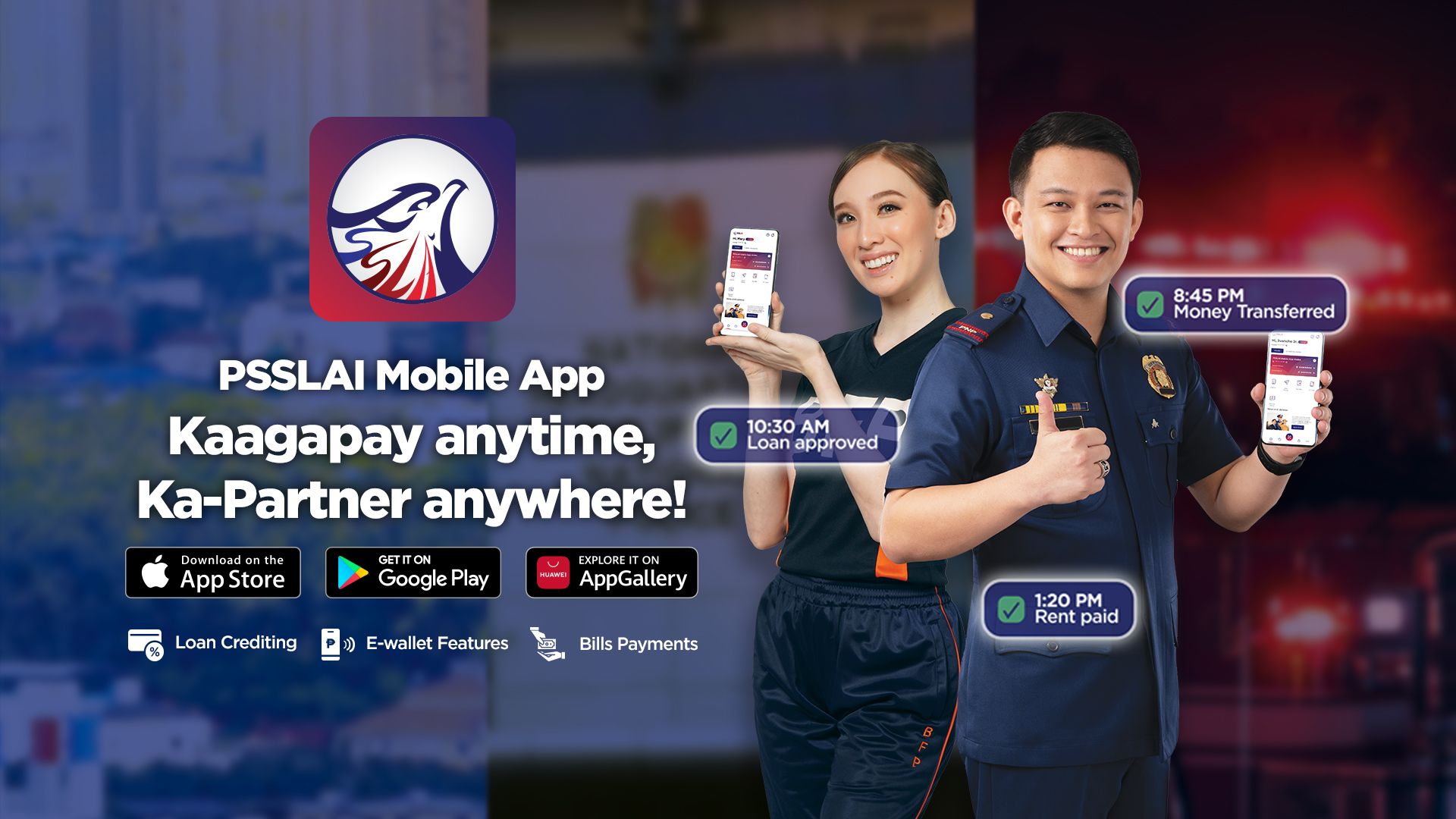
The PSSLAI Mobile App is a seamless, secure, and convenient mobile platform designed exclusively for PSSLAI members. It empowers users with a comprehensive suite of financial management tools that allows them to:
Easily check PSSLAI loan and deposit account balances.
Receive loan proceeds directly in the app's integrated e-wallet and receive funds from other sources.
View e-wallet balance and transfer funds from their PSSLAI Mobile App to:
Other e-wallets
Bank accounts
Conveniently pay bills and purchase telco and non-telco load.
Use QR codes to receive, send, and pay bills.
Available for Download



Frequently Asked Questions
1. How to register at PSSLAI Mobile App?
- Click the SIGN-UP button available on the login page.
- Upon clicking SIGN-UP, the system will display the application's Privacy Policy and Terms and Conditions.
- Once the user agrees, they will be redirected to the SIGN-UP form.
- In the form, the user will be prompted to enter their iTrack or registered mobile number in PSSLAI and PSSLAI Member ID Number.
- The user will receive a 6-digit OTP via SMS when validated correctly.
- To complete the registration, the user must fill out the account security form including the user’s Mobile PIN (MPIN) and Password.
2. How can I verify my account in the PSSLAI Mobile App?
After successfully creating an account, the user will be able to log into the PSSLAI Ko app. First time users and those who have not yet completed the e-KYC process will be prompted to complete the process.
- Review your details and fill out the necessary information
- Take a photo of your valid ID
- Perform a live face scan (selfie)
- Confirm your submission
- Wait for system verification and approval
3. How to activate PSSLAI Mobile App?
- After successfully creating an account, the user will be able to log in the PSSLAI Mobile app.
- First time users and those who have not yet completed the e-KYC process will be prompted to complete the process.
4. What are the requirements to register on the PSSLAI Mobile App?
To register, members must have:
- A smartphone (Android, iOS, or Huawei) with the latest OS
- A stable internet connection
- The PSSLAI Mobile App installed (via Google Play Store, Apple App Store, or Huawei AppGallery)
- Your PSSLAI Membership Number (found on your PSSLAI ID)
- An updated mobile number:
- If enrolled in iTrack, this will serve as your primary linked number
- Otherwise, the mobile number registered in your PSSLAI records will be used
- An active email address (used for verification and notifications)
5. What if my registered iTrack number or mobile number in PSSLAI is no longer active or updated?
Update your number via:
- eUpdate Portal: https://eupdate.psslai.com/login
- Nearest PSSLAI Office: Fill out the update form and present a valid PSSLAI ID
6. What if my registered email address is no longer active or updated?
Your email address is required to receive account notifications and complete your registration in the PSSLAI Ko mobile app. If your email is no longer active, you may not be able to sign up or receive important updates. To update your email:
- Visit the nearest PSSLAI Office
- Submit the update form with your valid PSSLAI ID
7. What if I can’t sign up for the PSSLAI Mobile App?
To access and fully enjoy the features of the PSSLAI Mobile App, make sure your mobile number and email address are updated in PSSLAI records. If your contact details are no longer active, you may experience issues signing up or receiving important notifications. You may update your information through any of the following:
- Email membercare@psslai.com
- Member Care Hotlines 0998 962 2081 or 0917 856 7443
- Visit any PSSLAI near you. Present your PSSLAI ID
8. Is there a web version of PSSLAI Mobile App?
Currently, the PSSLAI Mobile App is designed specifically for mobile devices and tablets to ensure secure and convenient access for members. While the web-based version is not yet available, PSSLAI is actively working on expanding our digital services.
9. Can I access the PSSLAI Mobile App when I'm outside the Philippines?
Yes, as long as you have a Philippine-registered mobile number and stable internet. However, you can only transact with Philippine-based services and payees.
10. Are there any fees or charges involved?
Yes. Convenience fees may apply depending on the transaction type. These fees help cover service charges from partner providers and payment channels. Below are the corresponding fees and charges:
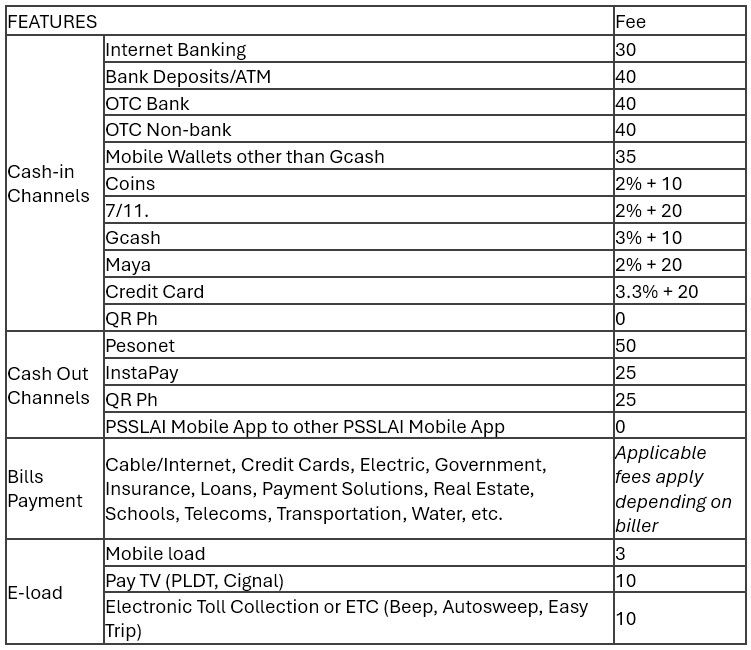
11. Are there limits when crediting loan proceeds to your PSSLAI Mobile App eWallet?
Loan proceeds can be credited in full to the member's PSSLAI Mobile App eWallet. However, please note that there are daily and monthly limits applicable to cash-out and withdrawal transactions from the eWallet.
12. Are there associated fees when loan proceeds are credited to a PSSLAI Mobile App wallet account?
Yes, minimal fees apply when loan proceeds are credited to the PSSLAI Mobile App eWallet. The good news is, these charges are lower compared to other disbursement channels, making the eWallet a more affordable and convenient option for our members.
13. Can I apply for a loan through PSSLAI Mobile App?
PSSLAI is committed to providing a smooth and convenient loan application experience. While we work on enhancing our services, you can still apply for a loan through the following:
- Sales Contact Center: 0998-843-6073, 0998-534-5171, or 0998-573-1854.
- Member Care Team: email your full name, contact number, and current location to membercare@psslai.com so our Member Care Team can endorse your inquiry to our Sales Team.
14. How can I transfer funds or cash into my PSSLAI Mobile App eWallet?
You can choose from a variety of cash-in options depending on your convenience and preferred channel. These include:
- Internet Banking
- Bank deposits/ATM
- OTC bank
- OTC non-bank
- Mobile wallets other than GCASH
- COINS
- GCash
- MAYA
- Credit Card
- Instapay
15. How can I transfer funds from my PSSLAI Mobile App eWallet to other eWallet or Bank accounts?
- Pesonet
- Instapay
- QRPH
16. Can I transfer funds from my eWallet to my accounts in PSSLAI?
The eWallet is currently designed to help you receive loan proceeds and manage outgoing transactions with ease and convenience. For internal fund transfers between your PSSLAI accounts, you can use the iTrack SMS facility or visit the nearest PSSLAI branch for assistance. These options ensure secure and verified processing of your requests.
17. What are the limits for transferring funds from my eWallet to other eWallets or bank accounts?
You can make an unlimited number of transactions daily as long as the total amount stays within the maximum daily and monthly transfer limits.
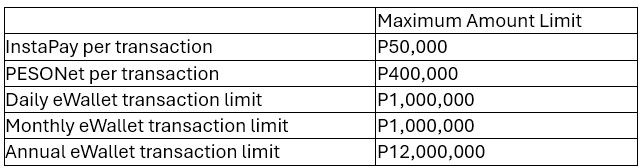
18. What is the maximum number of transactions allowed using the PSSLAI Mobile App per day?
While there is no limit to the number of transactions you can perform in a day, the maximum amount that you can transfer to other eWallets or bank accounts is subject to the allowed limits. You may use the app as often as needed for bills payments, loan payments, and other services.
19. What are the cut-off times for PESONet transactions?
- Transactions made before 3:00 PM on banking days: Funds will be credited to the recipient’s account by 11:00 PM on the same day.
- Transactions made after 3:00 PM, on weekends, or holidays: Funds will be credited by 11:00 PM on the next banking day.
20. How long does it take to transfer funds via Instapay?
InstaPay processes transactions in real-time. Funds are credited instantly to the recipient’s account.
21. I accidentally transferred funds to the wrong account. How can I recover the funds?
Please email membercare@psslai.com and provide the following details:
- Transaction Reference Number
- PSSLAI App Account Number
- Registered Mobile Number
- Date/Time of Transaction
- Amount Sent
Note: Your request will be subject to coordination and verification with nominated banks.
22. Can I cancel a fund transfer transaction after it has been processed?
Once a fund transfer is successfully processed, it is final and cannot be canceled or reversed. To avoid errors, always double-check the recipient details and transaction amount before confirming.
23. Can I transfer funds from my PSSLAI accounts to my PSSLAI Mobile App eWallet?
We're excited about the ongoing enhancements to our services! While direct transfers from your CAPCON, PSA, or CASA to your PSSLAI Mobile App eWallet are part of a future phase, they're not yet available in our current phase.
The good news is you can seamlessly transfer funds between your other PSSLAI accounts, like CapCon, PSA, and CASA, using our iTrack facility. Once your funds are in these accounts, you can easily transfer funds through our reliable partners, including PNB Over the Counter (OTC) services, MLhuillier, LBC or PNB cash cards. We're continuously working to bring you more features!
24. Can I update my personal information and other membership-related information via PSSLAI Mobile App?
While the PSSLAI Mobile App currently focuses on providing convenient access to your account and transactions, updates to your personal information can be made through our e-Update portal at: https://eupdate.psslai.com/login.
You may request updates for the following:
- Mobile number
- Registered iTrack or mobile number
- Residence address
For other personal or membership-related details—such as changes to your name, marital status, or employment information—we kindly ask that you visit the nearest PSSLAI office to ensure proper verification and secure processing. We’re continuously working to expand the app’s features, so stay tuned for future updates!
25. Is my information secure?
Yes. Your information is strictly protected and secured. PSSLAI Mobile App uses advanced security protocols and data encryption technologies to ensure that all personal and financial data are safe from unauthorized access. The app also follows industry-standard practices for user authentication, data privacy, and transaction monitoring.
26. How do I deactivate my PSSLAI Mobile App account?
We aim to make your experience as convenient and secure as possible. However, if you wish to deactivate your account, you may send a request via email to membercare@psslai.com. Please include your full name, member ID number, badge number (if applicable), registered mobile number and reason for deactivation in your email.
27. If I want to reactivate my PSSLAI Mobile App account, do I need to sign up again and go through the registration process all over?
Simply download the PSSLAI Mobile App again and log in using your previously registered account credentials.
Privacy Notice and Cookie Policy
PSSLAI uses cookies to personalize and enhance your experience on our site. For more information, please see our Privacy Notice and our Cookies Policy